

An account is compromised. But when your IT team starts retracing what happened, the usual phishing story doesn’t quite fit. The employee didn’t type a password into an obviously fake website. The authentication process went through Microsoft’s legitimate infrastructure. MFA may even have been completed successfully. From the user’s perspective, they followed many of the security habits they’ve been taught to follow.
So how did an attacker end up with authenticated access to the account?
One possible answer is device code phishing, an identity attack that has drawn 2026 warnings from both Microsoft and the FBI. Instead of simply tricking someone into handing over a password, attackers abuse a legitimate device authorization process to convince a user to approve access for a session the attacker controls.
First, a quick definition. A device code is a short string of letters and numbers, usually eight or nine characters, that a device displays when it cannot easily handle a normal sign-in screen. You enter that code on a Microsoft page from your phone or laptop and sign in as usual. The device is then granted access. It is a normal Microsoft feature, not a trick.
Two other terms are worth separating, because the rest of this article turns on the difference. Authentication is proving who you are, such as entering a password and approving a multifactor prompt. Authorization is what happens next: deciding what that proven identity is allowed to reach and handing over the access. Most security training focuses on the first. Device code phishing attacks the second.
For CPA firms, that matters because employees routinely receive shared documents, invoices, signature requests and other prompts that require authentication, often from people outside the firm. Device code phishing is designed to blend into those familiar workflows. Understanding how it works is becoming an important part of protecting the trusted identities behind the systems firms use every day.
What is device code phishing?
Device code phishing is a social engineering attack that tricks a legitimate user into authorizing an attacker’s device or session through that same device sign-in process. The process itself has legitimate uses. It was designed for devices that aren’t well suited to a traditional login, such as smart TVs or printers. A device displays a short code, and the user enters that code through a browser on another device to authenticate. Once approved, the original device receives access.
Attackers turn that process around:
- The attacker initiates the request and generates a legitimate device code.
- A phishing lure presents the code and directs the victim toward an authentication workflow.
- The user authenticates, potentially through the real provider’s login infrastructure and with MFA.
- The attacker receives the access because the sign-in the employee just approved was the attacker’s, not their own.
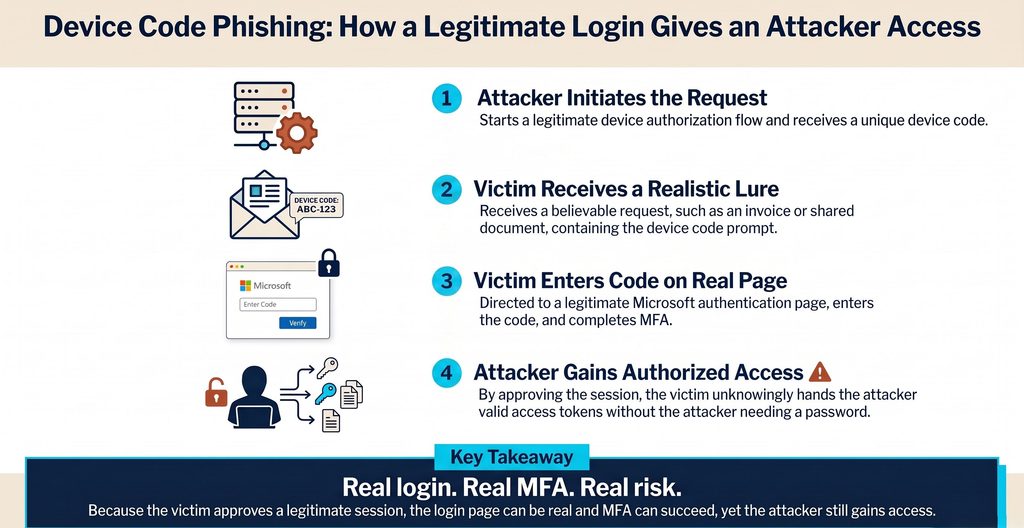
In the Microsoft campaigns receiving attention this year, victims have been redirected to Microsoft’s actual device login page. Successful authentication can hand the attacker valid digital keys to the account, including the ability to stay signed in without ever being asked for the password again.
Why this phishing attack can be so convincing
Most security awareness training has taught employees to look for familiar warning signs: a strange domain, a poorly replicated login page or a request to hand over credentials.
Device code phishing complicates that advice because part of the process really can be legitimate.
The FBI’s May warning about the Kali365 phishing-as-a-service platform describes victims being instructed to visit the real Microsoft verification page and enter a supplied device code. That action unknowingly authorizes the attacker’s device.
The surrounding lure is designed to look routine, too. Current campaigns have used invoices, requests for proposals, shared files, electronic signature requests and voicemail notifications. Mimecast threat research documented more than 50,000 malicious device code phishing campaigns between March and early May 2026, including attacks impersonating DocuSign and even familiar security enrollment processes.
Those scenarios are not far removed from a typical day inside a CPA firm. Tax, audit and advisory teams constantly exchange documents with clients and outside parties. Employees review agreements, open shared files and respond to requests under hard deadlines.
That is what makes this attack more difficult than simply telling employees, “Don’t click suspicious links.” The attacker is deliberately inserting the malicious step into a business process that feels normal.
If MFA worked, why did the attacker still get access?
Device code phishing does not mean MFA has stopped being valuable. MFA remains an essential security control, and stronger phishing-resistant authentication methods can further reduce risk.
Authentication confirms who the user is. It does not confirm what that user is authorizing, or who ends up holding the access.
In a device code attack, the employee may successfully prove their identity through a legitimate authentication process. But the session they are approving was initiated by the attacker. Once that authorization is complete, the attacker can keep using the account with those stolen sign-in keys, with no further password or MFA prompt required.
This is one reason CPA firms need to think about security beyond the initial login. As we discussed in CPA Firms Need More Than MFA for Microsoft 365 Security, authentication remains an important layer, but proving identity at the front door tells the firm nothing about how that access is used afterward.
What happens after a device code attack succeeds?
Once valid access is obtained, attackers can move quickly. In its April investigation, Microsoft observed post-compromise activity that included:
- Mapping organizational structures and account permissions
- Identifying financial, executive and administrative users
- Accessing and exfiltrating email
- Searching communications for wire details, invoices and executive correspondence
- Creating malicious inbox rules
- Establishing persistence so access can continue
In some observed cases, attackers registered their own devices on the account within 10 minutes, so their access would survive even a password reset. For CPA firms, the potential impact goes well beyond one account. Access could expose client communications, tax information, financial records or conversations involving payments. A compromised account can also be used to impersonate a trusted employee when communicating with colleagues or clients
That can create the conditions for business email compromise and financial fraud, particularly when attackers can observe communications before choosing when and how to act.
How CPA firms can reduce device code phishing risk
There is no single control that eliminates this type of attack. The stronger approach is to reduce opportunities for device code abuse while preparing to detect suspicious activity if an account is compromised.
CPA firm IT teams should consider several areas:
- Review whether device code authentication is needed. Microsoft recommends blocking device code flow wherever possible. Where there is a legitimate business need, Conditional Access policies can restrict when and how it is used.
- Audit before changing access policies. The FBI recommends identifying legitimate device code dependencies before applying broad restrictions that could interrupt necessary workflows.
- Update security awareness training. Employees need to know that a legitimate domain does not automatically make an unexpected authentication request safe. Unsolicited instructions to enter a device code deserve scrutiny, even if the next page is authentic.
- Review OAuth applications and permissions. Unexpected applications, unusual permissions or recent authorizations that don’t fit normal business use deserve investigation.
- Keep MFA in place. Device code phishing is not an argument against MFA. Firms should continue using it and consider phishing-resistant authentication methods where appropriate.
- Monitor what happens after authentication. New inbox rules, abnormal file activity, unexpected devices or other deviations from normal account behavior may provide signs that valid access has fallen into the wrong hands.
- Have a containment process ready. If compromise is suspected, response may include revoking refresh tokens, forcing reauthentication or temporarily disabling an account when immediate containment is necessary.
Device code phishing exposes a larger identity security gap
Device code phishing is getting attention because the attack technique feels counterintuitive. The user can interact with legitimate authentication infrastructure, complete MFA and still authorize the wrong session.
But the longer-term lesson is broader. Attackers will continue finding different ways to acquire trusted access. Once they have it, the next opportunity to catch the compromise may come from what the account does rather than how it logged in.
For organizations that rely heavily on Microsoft 365, post-authentication monitoring can add another layer of protection. Microsoft 365 Identity Defense monitors activity across Outlook, SharePoint, Teams and OneDrive to identify indicators such as suspicious account behavior, mailbox manipulation, abnormal access and unauthorized third-party apps. Netgain handles investigation and response rather than adding another stream of alerts for an internal team to manage.
That monitoring complements MFA, conditional access, email security and employee training rather than replacing them.
Device code phishing reinforces an important change in how firms should think about identity security: confirming that an identity successfully authenticated is only part of the job. Firms also need enough visibility to recognize when the activity behind that trusted identity no longer looks like the employee they know.